# EventBus
[](https://travis-ci.org/mustafaturan/event_bus)
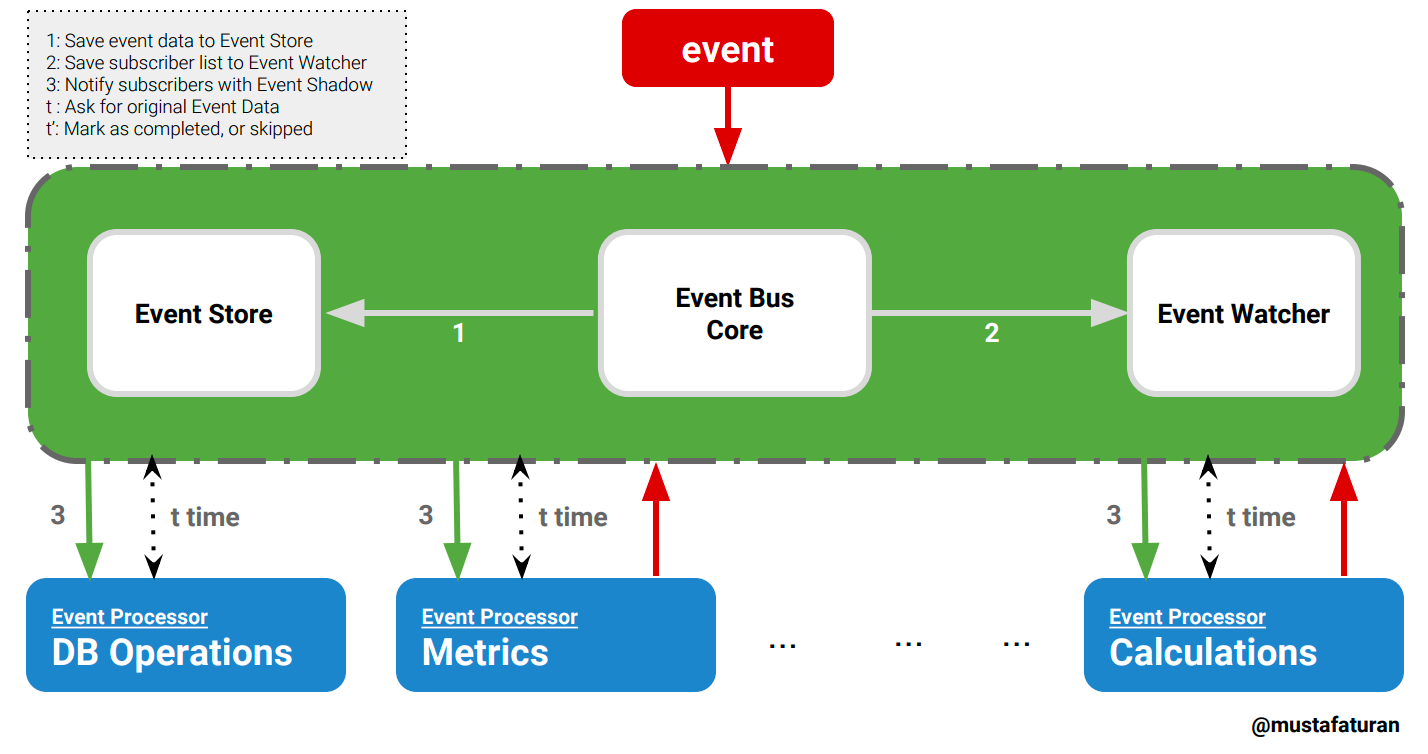
Simple event bus implementation using ETS as an event store.
## Installation
The package can be installed by adding `event_bus` to your list of dependencies in `mix.exs`:
```elixir
def deps do
[{:event_bus, "~> 0.5.0"}]
end
```
## Usage
Register event topics in `config.exs`
```elixir
config :event_bus, topics: [:message_received, :another_event_occured]
```
Subscribe to the 'event bus' with a listener and list of given topics, EventManager will match with Regex
```elixir
# to catch every event topic
EventBus.subscribe({MyEventListener, [".*"]})
> :ok
# to catch specific topics
EventBus.subscribe({MyEventListener, ["purchase_", "booking_confirmed$", "flight_passed$"]})
> :ok
```
Unsubscribe from the 'event bus'
```elixir
EventBus.unsubscribe(MyEventListener)
> :ok
```
List subscribers
```elixir
EventBus.subscribers()
> [{MyEventListener, [".*"]}]
```
List subscribers of a specific event
```elixir
EventBus.subscribers(:hello_received)
> [MyEventListener]
```
`EventBus.Model.Event` structure
```elixir
%EventBus.Model.Event{
id: String.t | integer(), # required
transaction_id: String.t | integer(), # optional
topic: atom(), # required
data: any() # required
}
```
**Why there is a `transaction_id` attribute on structure?**
Firstly, `transaction_id` attribute is an optional field, if you need to store any meta identifier related to event transaction, it is the place to store. Secondly, `transaction_id` is one of the good ways to track events related to the same transaction on a chain of events. If you have time, have a look to the [story](https://hackernoon.com/trace-monitor-chain-of-microservice-logs-in-the-same-transaction-f13420f2d42c).
Define an event struct
```elixir
alias EventBus.Model.Event
event = %Event{id: "123", transaction_id: "1",
topic: :hello_received, data: %{message: "Hello"}}
another_event = %Event{id: "124", transaction_id: "1",
topic: :bye_received, data: [user_id: 1, goal: "exit"]}
```
**Important Note:** It is important to have unique identifier for each event struct per topic. I recommend to use a unique id generator like `{:uuid, "~> 1.1"}`.
Notify all subscribers with `EventBus.Model.Event` data
```elixir
EventBus.notify(event)
> :ok
EventBus.notify(another_event)
> :ok
```
Fetch an event from the store
```elixir
topic = :bye_received
id = "124"
EventBus.fetch_event({topic, id})
> %EventBus.Model.Event{data: [user_id: 1, goal: "exit"], id: "124", topic: :bye_received, transaction_id: "1"}
```
Mark as completed on Event Watcher
```elixir
EventBus.mark_as_completed({MyEventListener, :bye_received, id})
> :ok
```
Mark as skipped on Event Watcher
```elixir
EventBus.mark_as_skipped({MyEventListener, :bye_received, id})
> :ok
```
### Sample Listener Implementation
```elixir
defmodule MyEventListener do
...
def process({topic, id} = event_shadow) do
GenServer.cast(__MODULE__, event_shadow)
:ok
end
...
def handle_cast({:bye_received, id}, state) do
event = EventBus.fetch_event({:bye_received, id})
# do sth with event
# update the watcher!
EventBus.mark_as_completed({__MODULE__, :bye_received, id})
...
{:noreply, state}
end
def handle_cast({:hello_received, id}, state) do
event = EventBus.fetch_event({:hello_received, id})
# do sth with EventBus.Model.Event
# update the watcher!
EventBus.mark_as_completed({__MODULE__, :hello_received, id})
...
{:noreply, state}
end
def handle_cast({topic, id}, state) do
EventBus.mark_as_skipped({__MODULE__, topic, id})
{:noreply, state}
end
...
end
```
### Event Storage Details
When an event configured in `config` file, 2 ETS tables will be created for the event on app start.
All event data is temporarily saved to the ETS tables with the name `:eb_es_<<topic>>` until all subscribers processed the data. This table is a read heavy table. When a subscriber needs to process the event data, it queries this table to fetch event data.
To watch event status, a separate watcher table is created for each event type with the name `:eb_ew_<<topic>>`. This table is used for keeping the status of the event. `EventWatcher` updates this table frequently with the notification of the event processors/subscribers.
When all subscribers process the event data, data in the event store and watcher, automatically deleted by the `EventWatcher`. If you need to see the status of unprocessed events, event watcher table is one of the good places to query.
For example; to get the list unprocessed events for `:hello_received` event:
```elixir
# The following command will return a list of tuples with the `id`, and `event_subscribers_list` where `subscribers` is the list of event subscribers, `completers` is the subscribers those processed the event and notified EventWatcher, and lastly `skippers` is the subscribers those skipped the event without processing.
# Assume you have an event with the name ':hello_received'
:ets.tab2list(:eb_ew_hello_received)
> [{id, {subscribers, completers, skippers}}, ...]
```
ETS storage SHOULD NOT be considered as a persistent storage. If you need to store events to a persistant data store, then subscribe to all event types by a module with `[".*"]` event topic then save every event data.
For example;
```elixir
EventBus.subscribe({MyDataStore, [".*"]})
# then in your data store save the event
defmodule MyDataStore do
...
def process({topic, id} = event_shadow) do
GenServer.cast(__MODULE__, event_shadow)
:ok
end
...
def handle_cast({topic, id}, state) do
event = EventBus.fetch_event({topic, id})
# write your logic to save event_data to a persistant store
EventBus.mark_as_completed({__MODULE__, topic, id})
{:noreply, state}
end
end
```
### Documentation
Module docs can be found at [https://hexdocs.pm/event_bus](https://hexdocs.pm/event_bus).
Implementation details can be found at: https://medium.com/@mustafaturan/event-bus-implementation-s-d2854a9fafd5
## Contributing
### Issues, Bugs, Documentation, Enhancements
1. Fork the project
2. Make your improvements and write your tests(make sure you covered all the cases).
3. Make a pull request.
## License
MIT
