# Legion
[](https://github.com/dimamik/legion/actions/workflows/ci.yml)
[](https://github.com/dimamik/legion/blob/main/LICENSE)
[](https://hex.pm/packages/legion)
[](https://hexdocs.pm/legion)
<!-- MDOC -->
An Elixir framework for building AI agents that write and execute code instead of making function calls.
Traditional agents call tools one at a time - fetch, wait, decide, fetch again - burning tokens and latency on every round-trip. Legion agents write Elixir code that fetches, filters, decides, and acts in a single step, running safely in a sandbox. Fewer LLM calls, smarter behavior, full language expressivity. [Why code execution beats function calling.](https://www.anthropic.com/engineering/code-execution-with-mcp)
## Quick Start
### 1. Define your tools
Tools are regular Elixir modules. The LLM sees their source code and can call any public function.
```elixir
defmodule MyApp.Tools.ScraperTool do
use Legion.Tool
@doc "Fetches recent posts from HackerNews"
def fetch_posts do
Req.get!("https://hn.algolia.com/api/v1/search_by_date").body["hits"]
end
end
defmodule MyApp.Tools.DatabaseTool do
use Legion.Tool
@doc "Saves a post title to the database"
def insert_post(title), do: Repo.insert!(%Post{title: title})
end
```
### 2. Define an agent
Agents are Elixir processes that receive tasks, write code to solve them, and maintain conversation state.
```elixir
defmodule MyApp.ResearchAgent do
@moduledoc """
Fetch posts, evaluate their relevance and quality, and save the good ones.
"""
use Legion.Agent
def tools, do: [MyApp.Tools.ScraperTool, MyApp.Tools.DatabaseTool]
end
```
### 3. Run it
```elixir
{:ok, result} = Legion.execute(MyApp.ResearchAgent, "Find cool Elixir posts about Advent of Code and save them")
# => {:ok, "Found 3 relevant posts and saved 2 that met quality criteria."}
```
## How It Works
When you send _"Find cool Elixir posts about Advent of Code and save them"_, the agent writes:
```elixir
ScraperTool.fetch_posts()
|> Enum.filter(fn post ->
title = String.downcase(post["title"] || "")
String.contains?(title, "elixir") and String.contains?(title, "advent")
end)
```
It sees the results, decides which posts are worth saving, and writes:
```elixir
["Elixir Advent of Code 2024 - Day 5 walkthrough", "My first AoC in Elixir!"]
|> Enum.each(&DatabaseTool.insert_post/1)
```
A traditional agent would need a separate LLM call for each filter decision and each insert. Legion handles filtering, judgment, and action in two steps - with the full power of Elixir's `Enum`, pattern matching, and pipelines available at every step.
## Features
- **Code generation over function calling** - Agents write Elixir pipelines, not individual tool calls. Fewer tokens, fewer round-trips, smarter behavior.
- **Sandboxed execution** - Generated code runs in a restricted environment. Dangerous constructs (`defmodule`, `spawn`, `send`, `import`) are blocked at the AST level. Module access is limited to stdlib + your tools.
- **Tools are just modules** - `use Legion.Tool` on any module to expose it. The LLM reads your source code and calls your functions. No schemas to write, no wrappers - reuse existing app logic directly.
- **Authorization via Vault** - Set auth context before the agent starts, validate inside tools at runtime. LLM-generated code never touches credentials. See [Vault](https://github.com/dimamik/vault).
- **Long-lived agents** - Start agents with `Legion.start_link/2` and message them with `call/2` and `cast/2`, just like a GenServer. Variables can persist across turns with `binding_scope: :conversation`.
- **Multi-agent orchestration** - Agents delegate to other agents via the built-in `AgentTool`. Fan out with `parallel/2`, chain with `pipeline/1`. Sub-agents are linked processes - when a parent dies, children stop too.
- **Human in the loop** - The built-in `HumanTool` pauses agent execution until a human responds. It's just message passing - your handler receives a question and sends back an answer.
- **Structured output** - Define a JSON Schema via `output_schema/0` to get typed, validated responses. Or skip it and work with plain text.
- **Telemetry** - Events for agent lifecycle, messages, iterations, LLM calls, and code evaluation. Plug into any monitoring stack.
- **Process-native** - Agents are BEAM processes. Supervision trees, process groups, hot code reloading, lightweight concurrency - all work out of the box.
## Installation
Add `legion` to your dependencies:
```elixir
def deps do
[
{:legion, "~> 0.3"}
]
end
```
Configure your LLM provider ([all options](https://hexdocs.pm/req_llm/ReqLLM.html#module-configuration)):
```elixir
# config/runtime.exs
config :req_llm, openai_api_key: System.get_env("OPENAI_API_KEY")
```
## Long-lived Agents
```elixir
# Start an agent that maintains context
{:ok, pid} = Legion.start_link(MyApp.AssistantAgent)
# Send follow-up messages
{:ok, response} = Legion.call(pid, "Now filter for items over $100")
# Or fire-and-forget
Legion.cast(pid, "Also check the reviews")
```
## Multi-Agent Systems
Agents orchestrate other agents through the built-in `AgentTool`:
```elixir
defmodule MyApp.OrchestratorAgent do
@moduledoc "Coordinates research and writing sub-agents to produce finished content."
use Legion.Agent
def tools, do: [Legion.Tools.AgentTool, MyApp.Tools.DatabaseTool]
def tool_config(Legion.Tools.AgentTool), do: [agents: [MyApp.ResearchAgent, MyApp.WriterAgent]]
end
```
The orchestrator's generated code can then delegate:
```elixir
{:ok, research} = AgentTool.call(MyApp.ResearchAgent, "Find info about Elixir 1.18")
{:ok, draft} = AgentTool.call(MyApp.WriterAgent, "Write a blog post using: #{research}")
```
Run independent tasks in parallel or chain them sequentially:
```elixir
{:ok, [posts, trends]} = Legion.parallel([
{MyApp.ResearchAgent, "Find recent Elixir posts"},
{MyApp.AnalysisAgent, "Summarize Elixir trends"}
])
{:ok, result} = Legion.pipeline([
{MyApp.ResearchAgent, "Find Elixir blog posts from this week"},
{MyApp.WriterAgent, &"Summarize these posts: #{&1}"}
])
```
## Authorization
Set auth context before starting the agent. Tools read it at runtime via Vault. LLM-generated code has no access to Vault.
```elixir
Vault.init(current_user: %{id: user.id})
{:ok, result} = Legion.execute(MyApp.PostsAgent, "Find my posts from today and summarize them")
```
```elixir
defmodule MyApp.Tools.PostsTool do
use Legion.Tool
def get_my_posts do
%{id: user_id} = Vault.get(:current_user)
Repo.all(from p in Post, where: p.user_id == ^user_id)
end
end
```
## Human in the Loop
The `HumanTool` pauses agent execution and sends a question to your handler process:
```elixir
defmodule MyApp.AssistantAgent do
@moduledoc "An assistant that can ask the user questions."
use Legion.Agent
def tools, do: [Legion.Tools.HumanTool]
def tool_config(Legion.Tools.HumanTool), do: [handler: MyApp.ChatHandler, timeout: 30_000]
end
```
Your handler receives `{:human_request, ref, from_pid, question, meta}` and replies with `{:human_response, ref, answer}`.
## Configuration
```elixir
config :legion, :config, %{
model: "openai:gpt-4o-mini",
max_iterations: 10,
max_retries: 3,
sandbox_timeout: 60_000,
binding_scope: :turn,
max_message_length: 20_000
}
```
| Option | Description |
| -------------------- | -------------------------------------------------------------------------------------------------------------------------- |
| `max_iterations` | Successful execution steps before the agent is stopped. |
| `max_retries` | Consecutive failures (bad code, tool errors) before giving up. Resets after each success. |
| `binding_scope` | `:iteration` (fresh each step), `:turn` (persist within a message, default), or `:conversation` (persist across messages). |
| `max_message_length` | Byte limit for any single message. Longer content is truncated. Set to `:infinity` to disable. |
Agents override global config by defining `config/0`:
```elixir
defmodule MyApp.DataAgent do
@moduledoc "Fetches and processes data from HTTP APIs."
use Legion.Agent
def tools, do: [MyApp.HTTPTool]
def config, do: %{model: "anthropic:claude-sonnet-4-20250514", max_iterations: 5}
end
```
## Agent Callbacks
All optional with sensible defaults:
| Callback | Default | Description |
| ----------------- | ----------------------- | ---------------------------------------------- |
| `tools/0` | `[]` | Tool modules available to the agent |
| `output_schema/0` | `%{"type" => "string"}` | JSON Schema for structured output |
| `tool_config/1` | `[]` | Per-tool keyword config (accessible via Vault) |
| `system_prompt/0` | auto-generated | Override the entire system prompt |
| `config/0` | `%{}` | Model, timeouts, limits |
| `action_types/0` | all four actions | Restrict which actions the LLM can take |
## Third-Party Modules as Tools
Expose any module - even third-party ones like `Req` or `Jason` - without writing a wrapper:
```elixir
# config/config.exs
config :legion, extra_source_modules: [Req, Jason]
```
```elixir
defmodule MyApp.APIAgent do
@moduledoc "Fetches data from JSON APIs and decodes responses."
use Legion.Agent
def tools, do: [Req, Jason]
end
```
The LLM receives the module's full source and can call any public function in the sandbox.
For large libraries or when you want a curated interface, write a thin facade instead:
```elixir
defmodule MyApp.Tools.JSONTool do
use Legion.Tool
def description do
"""
JSONTool - encode and decode JSON.
## Functions
- `encode!(term)` - returns a JSON string
- `decode!(binary)` - returns a decoded term
"""
end
defdelegate encode!(term), to: Jason
defdelegate decode!(binary), to: Jason
end
```
## Agent Pools
Agents are BEAM processes - use `:pg` for pooling with zero external infrastructure:
```elixir
for _ <- 1..5 do
{:ok, pid} = Legion.start_link(SupportAgent)
:pg.join(:support_pool, pid)
end
defp handle_ticket(ticket) do
agent = :pg.get_members(:support_pool) |> Enum.random()
Legion.cast(agent, "Handle this support ticket: #{ticket}")
end
```
## Telemetry
```elixir
Legion.Telemetry.attach_default_logger()
```
Events emitted at every level:
- `[:legion, :agent, :started | :stopped]` - agent lifecycle
- `[:legion, :agent, :message, :start | :stop | :exception]` - per-message
- `[:legion, :iteration, :start | :stop | :exception]` - each execution step
- `[:legion, :llm, :request, :start | :stop | :exception]` - LLM API calls
- `[:legion, :sandbox, :eval, :start | :stop | :exception]` - code evaluation
## Web Dashboard
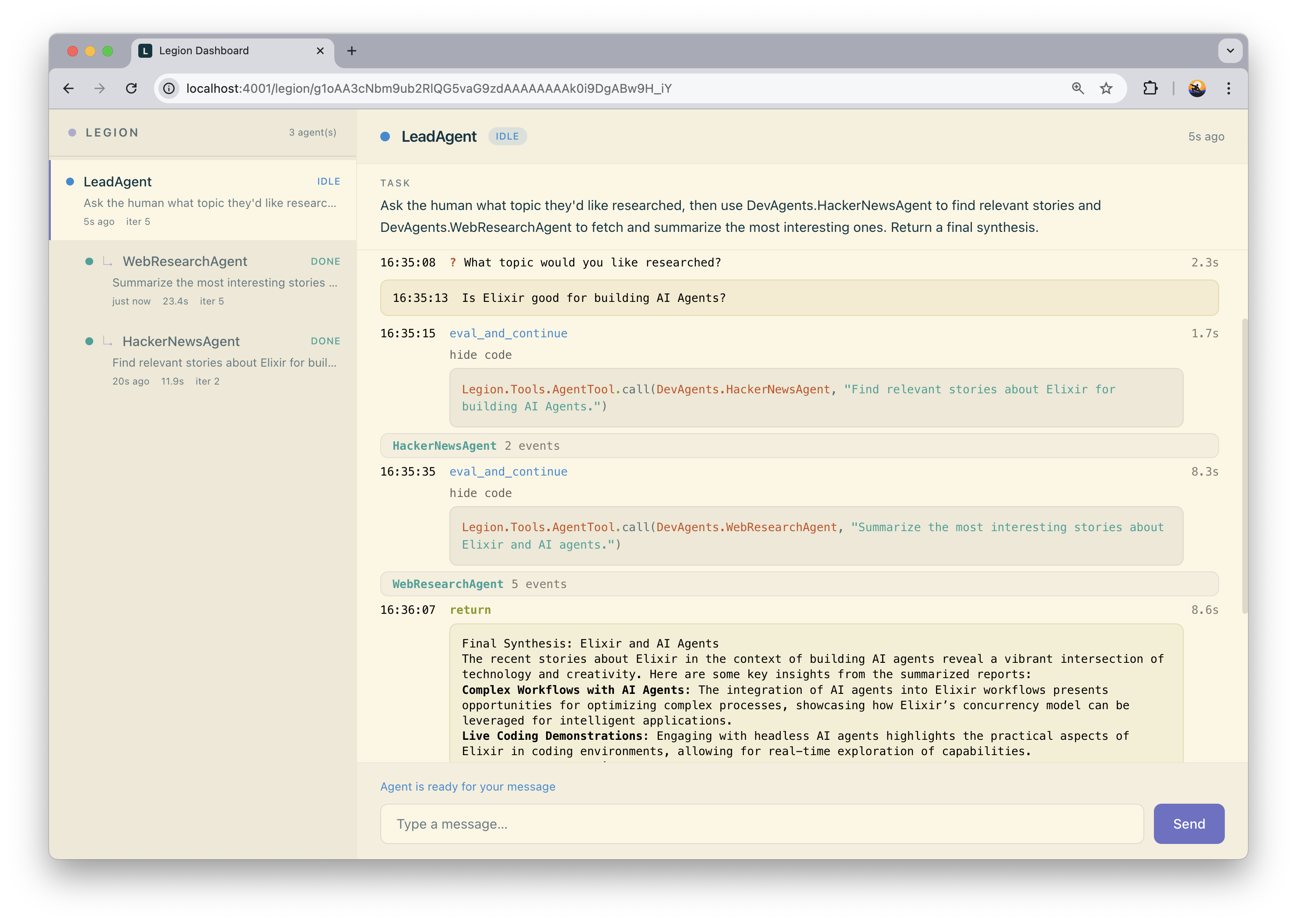
[`legion_web`](https://github.com/dimamik/legion_web) provides a real-time Phoenix LiveView dashboard for monitoring agents, viewing conversation traces, and inspecting generated code.
## Limitations
### Sandboxing
Legion's sandbox restricts what LLM-generated code can do, but it is not full process isolation. Generated code runs inside the same BEAM VM as your application.
**What the sandbox does:**
- Blocks dangerous constructs at the AST level: `defmodule`, `import`, `spawn`, `send`, `receive`, `apply`, and others
- Restricts module access to an explicit allowlist (stdlib + your tools)
- Kills evaluation if it exceeds `sandbox_timeout`
**What it does not do _yet_:**
- Isolate memory - runaway allocations affect the whole VM
- Prevent atom table exhaustion - `String.to_atom/1` is available and atoms are never garbage collected
- Restrict access to BEAM node name, process pid, or refs
Legion is built for trusted code generators (your own LLM-backed agents with controlled tool access), not for running arbitrary code from unknown sources. If your threat model requires full isolation, run agents in a separate BEAM instance.
<!-- MDOC -->
## License
MIT License - see [LICENSE](LICENSE) for details.
