<div align="center">
<img src="https://github.com/Valian/live_vue/blob/main/live_vue_logo_rounded.png?raw=true" alt="Description" height="256px">
<br>
<a href="https://hex.pm/packages/live_vue"><img src="https://img.shields.io/hexpm/v/live_vue.svg" alt="Hex.pm"></a>
<a href="https://hexdocs.pm/live_vue"><img src="https://img.shields.io/badge/docs-hexdocs.pm-purple" alt="Hexdocs.pm"></a>
<a href="https://github.com/Valian/live_vue"><img src="https://img.shields.io/github/stars/Valian/live_vue?style=social" alt="GitHub"></a>
<br><br>
Vue inside Phoenix LiveView with seamless end-to-end reactivity.
</div>
## Features
- ⚡ **End-To-End Reactivity** with LiveView
- 🧙♂️ **One-line Install** - Automated setup via Igniter installer
- 🔋 **Server-Side Rendered** (SSR) Vue
- 🐌 **Lazy-loading** Vue Components
- 📦 **Efficient Props Diffing** - Only changed data is sent over WebSocket
- 🪄 **~VUE Sigil** as an alternative LiveView DSL with VS Code syntax highlighting
- 🎯 **Phoenix Streams** Support with efficient patches
- 🦄 **Tailwind** Support
- 🦥 **Slot Interoperability**
- 📁 **File Upload Composable** - `useLiveUpload()` for seamless Vue integration with LiveView uploads
- 📝 **Comprehensive Form Handling** - `useLiveForm()` with server-side validation via Ecto changesets
- 🚀 **Amazing DX** with Vite
## Resources
- [Live Examples](https://livevue.skalecki.dev) - Interactive demos
- [HexDocs](https://hexdocs.pm/live_vue)
- [HexPackage](https://hex.pm/packages/live_vue)
- [Phoenix LiveView](https://github.com/phoenixframework/phoenix_live_view)
## Example
After installation, you can use Vue components in the same way as you'd use functional LiveView components. You can even handle Vue events with `JS` hooks! All the `phx-click`, `phx-change` attributes works inside Vue components as well.
```html
<script setup lang="ts">
import {ref} from "vue"
// props are passed from LiveView
const props = defineProps<{count: number}>()
// local state
const diff = ref(1)
</script>
<template>
Current count: {{ props.count }}
<label>Diff: </label>
<input v-model.number="diff" type="range" min="1" max="10" />
<button phx-click="inc" :phx-value-diff="diff">
Increase counter by {{ diff }}
</button>
</template>
```
```elixir
defmodule MyAppWeb.CounterLive do
use MyAppWeb, :live_view
def render(assigns) do
~H"""
<.vue count={@count} v-component="Counter" v-socket={@socket} />
"""
end
def mount(_params, _session, socket) do
{:ok, assign(socket, count: 0)}
end
def handle_event("inc", %{"diff" => value}, socket) do
{:noreply, update(socket, :count, &(&1 + value))}
end
end
```
## Why?
Phoenix Live View makes it possible to create rich, interactive web apps without writing JS.
But once you'll need to do anything even slightly complex on the client-side, you'll end up writing lots of imperative, hard-to-maintain hooks.
LiveVue allows to create hybrid apps, where part of the session state is on the server and part on the client.
### Reasons why you'd like to use LiveVue
- Your hooks are starting to look like jQuery
- You have a complex local state
- You'd like to use a massive Vue ecosystem
- You want transitions, graphs etc.
- You simply like Vue 😉
## Installation
**New project:**
```bash
mix archive.install hex igniter_new
mix igniter.new my_app --with phx.new --install live_vue
```
**Existing project (Phoenix 1.8+ only):**
```bash
mix igniter.install live_vue
```
Igniter installer works only for Phoenix 1.8+ projects. For detailed installation instructions, see the [Installation Guide](guides/installation.md).
## VS Code Extension
For syntax highlighting of the `~VUE` sigil:
- **VS Code Marketplace**: Install [LiveVue](https://marketplace.visualstudio.com/items?itemName=guilhermepsf23.livevue-sigil-highlighting) extension
- **Manual Installation**: Download VSIX from [releases](https://github.com/GuilhermePSF/live-vue-sigil-highlighting/releases) and install via `Extensions > Install from VSIX...`
## Guides
### Getting Started
- [Getting Started](guides/getting_started.md) - Create your first Vue component with transitions
### Core Usage
- [Basic Usage](guides/basic_usage.md) - Fundamental patterns, ~VUE sigil, and common examples
- [Forms and Validation](guides/forms.md) - Complex forms with server-side validation using useLiveForm
- [Configuration](guides/configuration.md) - Advanced setup, SSR, and customization options
### Reference
- [Component Reference](guides/component_reference.md) - Complete syntax documentation
- [Client-Side API](guides/client_api.md) - Vue composables and utilities
### Advanced Topics
- [Architecture](guides/architecture.md) - How LiveVue works under the hood
- [Testing](guides/testing.md) - Testing Vue components in LiveView
- [Deployment](guides/deployment.md) - Production deployment guide
### Help & Troubleshooting
- [FAQ](guides/faq.md) - Common questions and comparisons
- [Troubleshooting](guides/troubleshooting.md) - Debug common issues
- [Comparison](guides/comparison.md) - LiveVue vs other solutions
## Relation to LiveSvelte
This project is heavily inspired by ✨ [LiveSvelte](https://github.com/woutdp/live_svelte) ✨. Both projects try to solve the same problem. LiveVue was started as a fork of LiveSvelte with adjusted ESbuild settings, and evolved to use Vite and a slightly different syntax. I strongly believe more options are always better, and since I love Vue and it's ecosystem I've decided to give it a go 😉
You can read more about differences between Vue and Svelte [in FAQ](guides/faq.md#how-does-livevue-compare-to-livesvelte) or [in comparison guide](guides/comparison.md).
## LiveVue Development
### Local Setup
Ensure you have Node.js installed. Clone the repo and run `mix setup`.
No build step is required for the library itself - Vite handles TypeScript transpilation when consumers bundle their app.
Use `npm run e2e:test` to run the Playwright E2E tests.
### Testing Local Changes in Another Project
To test local LiveVue changes in a separate Phoenix project, use a path dependency in your project's `mix.exs`:
```elixir
{:live_vue, path: "../live_vue"}
```
Then run `mix deps.get && npm install`. The installer already configures `package.json` to use `file:./deps/live_vue`, so both Elixir and npm will point to your local copy.
Elixir changes are reflected immediately. For TypeScript changes, run `npm install` again to pick them up.
### Releasing
Release is done with `expublish` package.
- Write version changelog in untracked `RELEASE.md` file
- Update version in `INSTALLATION.md`
Run
```bash
git add INSTALLATION.md
git commit -m "INSTALLATION version bump"
# to ensure everything works fine
mix expublish.minor --dry-run --allow-untracked --branch=main
# to publish
mix expublish.minor --allow-untracked --branch=main
```
## Features Implemented 🎯
- [x] `useLiveEvent` - automatically attaching & detaching [`handleEvent`](https://hexdocs.pm/phoenix_live_view/js-interop.html#client-hooks-via-phx-hook)
- [x] JSON Patch diffing - send only changed props over the WebSocket
- [x] VS Code extension - syntax highlighting for `~VUE` sigil
- [x] Igniter installer - one-line installation for Phoenix 1.8+ projects
- [x] `useEventReply` - easy handling of `{:reply, data, socket}` responses
- [x] `useLiveForm` - Ecto changesets & server-side validation
- [x] Phoenix Streams - full support for `stream()` operations
## Credits
[LiveSvelte](https://github.com/woutdp/live_svelte)
## Star History
[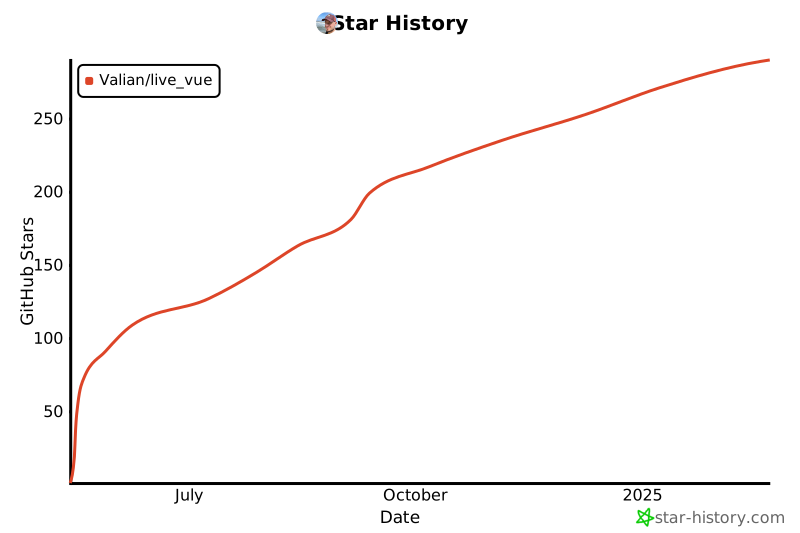](https://star-history.com/#Valian/live_vue&Date)
