# Lotus Web
<p>
<a href="https://hex.pm/packages/lotus_web">
<img alt="Hex Version" src="https://img.shields.io/hexpm/v/lotus_web.svg">
</a>
<a href="https://hexdocs.pm/lotus_web">
<img src="https://img.shields.io/badge/docs-hexdocs-blue" alt="HexDocs">
</a>
<a href="https://github.com/typhoonworks/lotus_web/actions">
<img alt="CI Status" src="https://github.com/typhoonworks/lotus_web/workflows/ci/badge.svg">
</a>
</p>
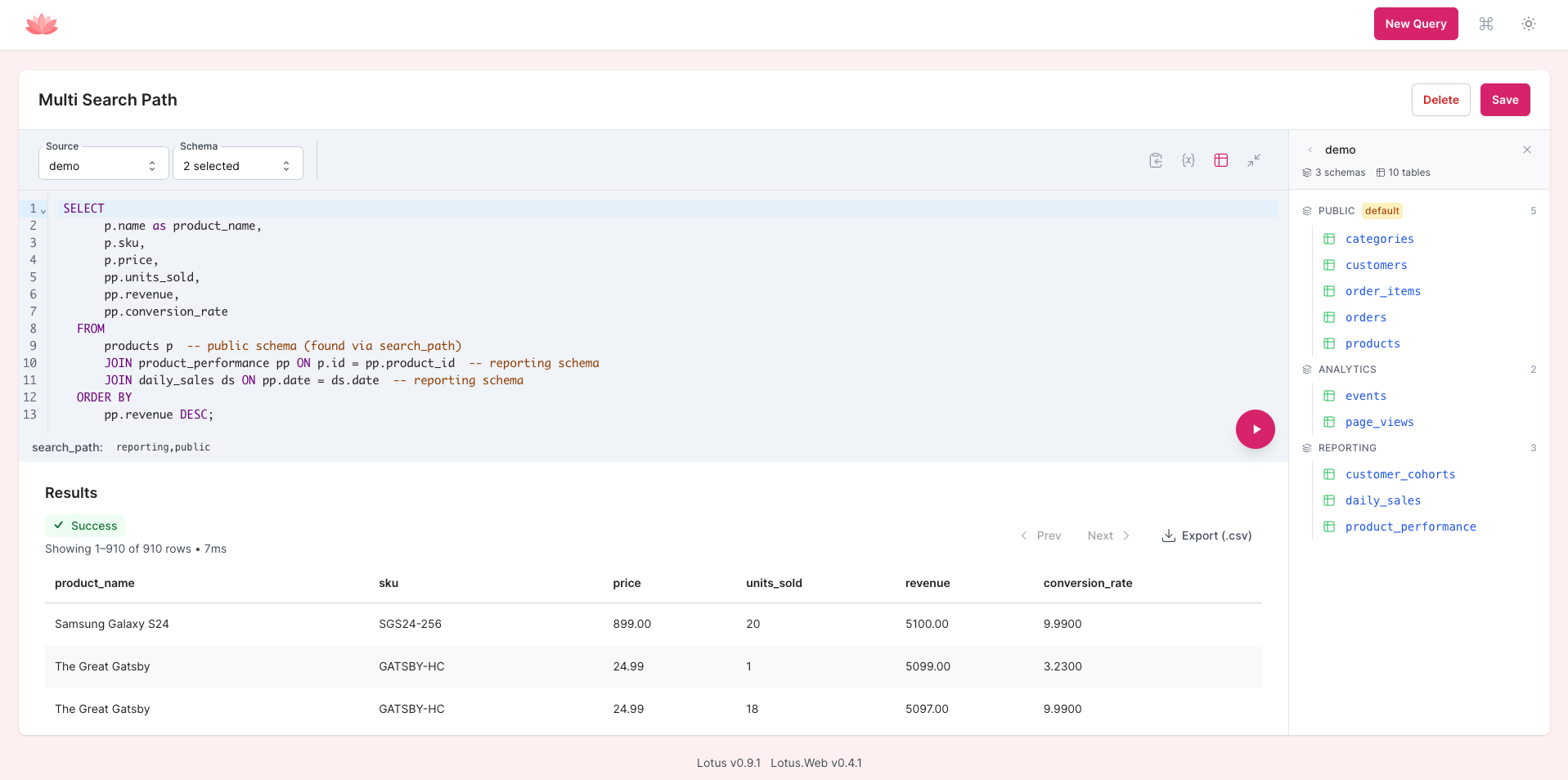
**A LiveView-powered BI interface that mounts directly in your Phoenix app — SQL editor, dashboards, charts, and AI-powered query generation in plain English. No separate deployment needed.**
[Try the live demo](https://lotus.typhoon.works/)
<!-- TODO: Replace with a 30-second demo GIF showing: mount in router → open browser → write SQL → see chart → save to dashboard -->
## Why Lotus Web?
You shouldn't need to deploy Metabase or Redash just to query your database. Lotus Web gives your team a full BI interface inside your existing Phoenix app — one dependency, one route, done. It shares your app's authentication, runs on your existing infrastructure, and is read-only by design.
We're running Lotus Web in production at [Accomplish](https://accomplish.dev).
> While Lotus Web already has a solid feature set and its API surface is stabilizing, it's still evolving. We'll make a best effort to announce breaking changes, but we can't guarantee full backwards compatibility yet.
## Quick Start
### 1. Add dependencies
```elixir
# mix.exs
def deps do
[
{:lotus, "~> 0.14.0"},
{:lotus_web, "~> 0.13.0"}
]
end
```
### 2. Configure Lotus
```elixir
# config/config.exs
config :lotus,
ecto_repo: MyApp.Repo,
default_repo: "main",
data_repos: %{
"main" => MyApp.Repo
}
```
### 3. Run the migration
```bash
mix ecto.gen.migration create_lotus_tables
```
```elixir
defmodule MyApp.Repo.Migrations.CreateLotusTables do
use Ecto.Migration
def up, do: Lotus.Migrations.up()
def down, do: Lotus.Migrations.down()
end
```
```bash
mix ecto.migrate
```
### 4. Mount in your router
```elixir
# lib/my_app_web/router.ex
import Lotus.Web.Router
scope "/", MyAppWeb do
pipe_through [:browser, :require_authenticated_user]
lotus_dashboard "/lotus"
end
```
### 5. Visit `/lotus` in your browser
That's it. Full BI dashboard, running inside your Phoenix app.
## Features
### SQL Editor
Web-based SQL editor with syntax highlighting, autocomplete, and real-time execution powered by LiveView. Switch between configured databases, run queries with Cmd/Ctrl+Enter, and see results instantly.
See the [getting started guide](guides/getting-started.md) for more.
### Schema Explorer
Browse your database tables, columns, and statistics interactively. Click to inspect table structures and understand your data before writing queries.
### Visualizations
Toggle between table and chart views for any query result. 5 chart types available: bar, line, area, scatter, and pie. Configure axes and color grouping, then save the visualization alongside the query.
Keyboard shortcuts: Cmd/Ctrl+G (chart settings), Cmd/Ctrl+1 (table view), Cmd/Ctrl+2 (chart view).
See the [visualizations guide](guides/visualizations.md) for chart configuration details.
### Dashboards
Combine saved queries into interactive dashboards with a 12-column grid layout. Add query result cards, text (markdown), headings, and links. Configure auto-refresh intervals and share dashboards publicly via secure token URLs.
See the [dashboards guide](guides/dashboards.md) for layout and sharing details.
### Smart Variables and Widgets
Parameterize queries with `{{variable}}` syntax. Variables are automatically detected and rendered as input widgets. Supports text, number, and date types with configurable widgets — including dropdowns backed by static options or live SQL queries. Enable "Allow multiple values" on any variable to use tag inputs or multiselect dropdowns for SQL `IN` clauses.
See the [variables and widgets guide](guides/variables-and-widgets.md) for advanced usage.
### AI Query Assistant
Ask your database questions in plain English. The AI assistant discovers your schema, respects table visibility rules, and supports multi-turn conversations for iterative refinement — no other embeddable BI tool does this. Bring your own OpenAI, Anthropic, or Gemini API key. Open it with Cmd/Ctrl+K.
See the [AI assistant guide](guides/ai-assistant.md) for setup and provider options.
### Multi-Database Support
Execute queries against any configured Ecto repository. Switch between databases from the editor toolbar — useful for apps with separate analytics, reporting, or multi-tenant databases.
## Configuration
### Mount Options
```elixir
# Default
lotus_dashboard "/lotus"
# Custom route name
lotus_dashboard "/admin/queries", as: :admin_queries
# Custom WebSocket settings
lotus_dashboard "/lotus",
socket_path: "/live",
transport: "websocket"
# Additional mount callbacks
lotus_dashboard "/lotus",
on_mount: [MyAppWeb.RequireAdmin]
# Feature flags
lotus_dashboard "/lotus",
features: [:timeout_options]
```
| Feature | Description |
|---------|-------------|
| `:timeout_options` | Adds a per-query timeout selector (5s to 5m) to the editor toolbar |
### Caching (Optional, Recommended)
Add Lotus to your supervision tree and configure cache settings:
```elixir
# lib/my_app/application.ex
children = [
MyApp.Repo,
Lotus, # Enables caching
MyAppWeb.Endpoint
]
```
```elixir
# config/config.exs
config :lotus,
cache: [
adapter: Lotus.Cache.ETS,
profiles: %{
results: [ttl_ms: 60_000],
schema: [ttl_ms: 3_600_000],
options: [ttl_ms: 300_000]
}
]
```
### Internationalization
Lotus Web ships with a dedicated Gettext backend. To set the locale, store it in the Phoenix session:
```elixir
defp persist_user_locale(conn, _opts) do
user_locale = get_session(conn, :user_locale) || "en"
put_session(conn, :lotus_locale, user_locale)
end
```
To contribute translations, submit a PR with updates to `priv/gettext/<locale>/LC_MESSAGES/lotus.po`.
## Security
**Always mount behind authentication in production.** Lotus Web provides powerful query capabilities and should only be accessible to authorized users.
```elixir
# Always require authentication
scope "/", MyAppWeb do
pipe_through [:browser, :require_authenticated_user]
lotus_dashboard "/lotus"
end
```
Additional security layers:
- **Read-only execution** — all queries run in read-only transactions via Lotus
- **Table visibility controls** — hide sensitive tables and columns from the interface
- **Session safety** — secured by LiveView architecture with automatic session state restoration
- **Export security** — CSV exports use short-lived, signed, encrypted tokens
Configure table visibility in Lotus:
```elixir
config :lotus,
table_visibility: %{
default: [
allow: ["reports_users", "analytics_events"],
deny: ["users", "admin_logs"]
]
}
```
## How Lotus Web Compares
| | Lotus Web | Metabase | Redash | Blazer (Rails) | Livebook |
|---|---|---|---|---|---|
| **Deployment** | Mounts in your app | Separate service | Separate service | Mounts in your app | Separate service |
| **Extra infra** | None | Java + DB | Python + Redis + DB | None | None |
| **Auth** | Uses your app's auth | Separate system | Separate system | Uses your app's auth | Token-based |
| **SQL editor** | Yes | Yes | Yes | Yes | Code cells |
| **Dashboards** | Yes | Yes | Yes | No | No |
| **Charts** | 5 types | Many | Many | 3 types | Via libraries |
| **AI query gen** | Yes (BYOK) | No | No | No | No |
| **Read-only** | By design | Configurable | Configurable | Configurable | No |
| **Cost** | Free | Free/Paid | Free | Free | Free |
## Requirements
| Lotus Web | Lotus | Elixir | Phoenix |
|-----------|-------|--------|---------|
| 0.13.x | 0.14.0+ | 1.17+ | 1.7+ |
| 0.12.x | 0.13.0+ | 1.17+ | 1.7+ |
| 0.11.x | 0.12.0+ | 1.17+ | 1.7+ |
| 0.10.x | 0.11.0+ | 1.17+ | 1.7+ |
## Development
```bash
mix deps.get
# Ensure placeholder assets exist for compilation
mkdir -p priv/static/css
touch priv/static/css/app.css && touch priv/static/app.js
# Install frontend deps
npm install --prefix assets
# Start dev server
mix dev
```
### Running Tests
```bash
mix test
```
### AI Assistant Setup (Optional)
```bash
mix lotus.gen.dev.secret
```
Edit `config/dev.secret.exs` with your API key, then restart the dev server. See the [AI assistant guide](guides/ai-assistant.md) for provider options.
## Contributing
We welcome contributions! When reporting bugs, please include your Elixir/OTP versions, dependency versions, and steps to reproduce.
## Acknowledgments
Lotus Web owes significant inspiration to:
- **[Oban Web](https://hexdocs.pm/oban_web/)** — for the Phoenix mounting patterns and LiveView architecture
- **[Blazer](https://github.com/ankane/blazer)** — for proving the value of simple, embedded BI tools
- **The Phoenix LiveView team** — for making rich web interfaces simple to build
## License
This project is licensed under the MIT License - see the LICENSE file for details.
Portions of the code are adapted from [Oban Web](https://github.com/sorentwo/oban),
(c) 2025 The Oban Team, licensed under the Apache License 2.0 - see the LICENSE-APACHE file for details.
