# Lotus Web
<p>
<a href="https://hex.pm/packages/lotus_web">
<img alt="Hex Version" src="https://img.shields.io/hexpm/v/lotus_web.svg">
</a>
<a href="https://hexdocs.pm/lotus_web">
<img src="https://img.shields.io/badge/docs-hexdocs-blue" alt="HexDocs">
</a>
<a href="https://github.com/typhoonworks/lotus_web/actions">
<img alt="CI Status" src="https://github.com/typhoonworks/lotus_web/workflows/ci/badge.svg">
</a>
</p>
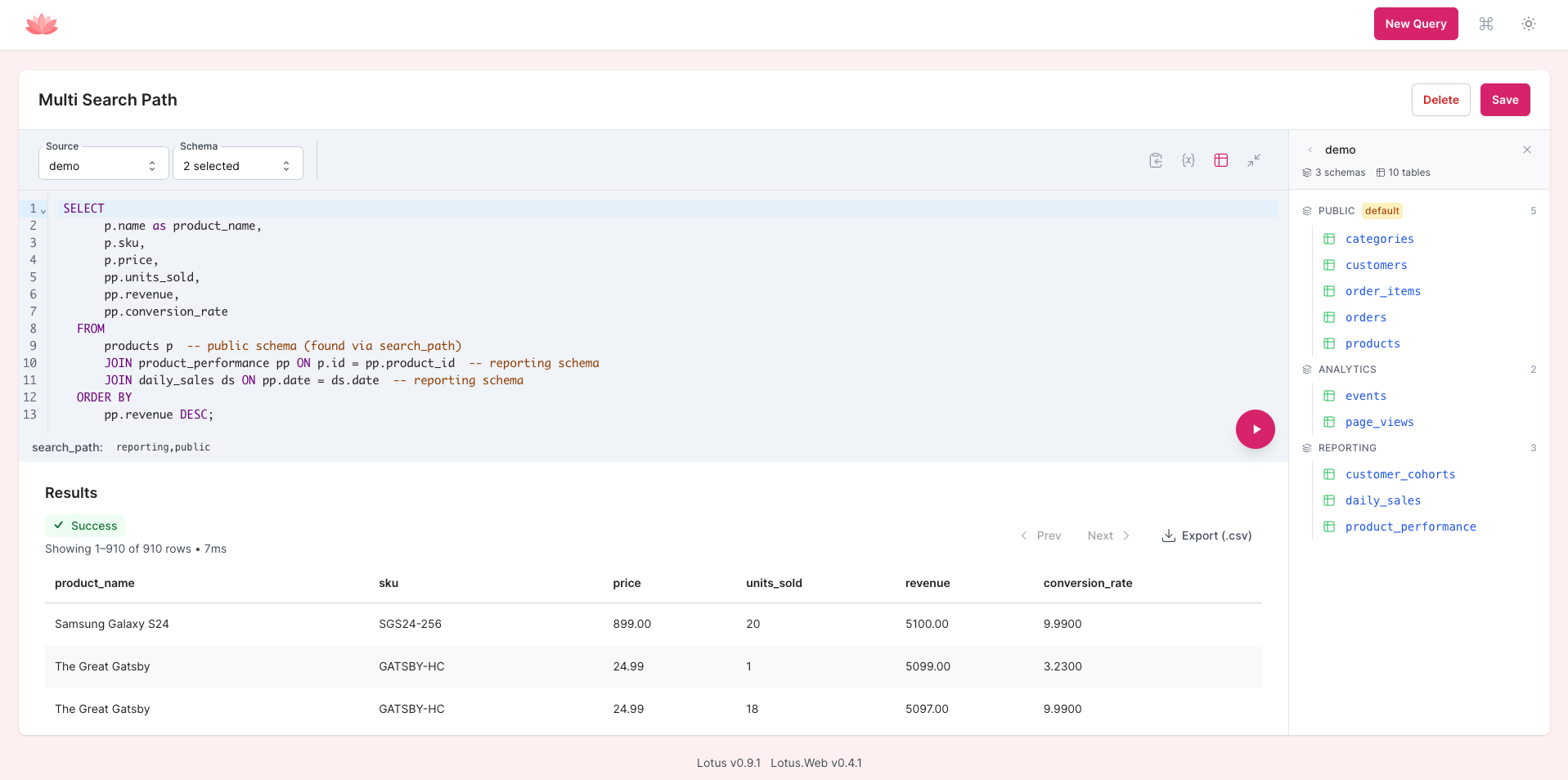
**A LiveView-powered BI interface that mounts directly in your Phoenix app — SQL editor, dashboards, charts, and AI-powered query generation in plain English. No separate deployment needed.**
[Try the live demo](https://lotus.typhoon.works/)
<!-- TODO: Replace with a 30-second demo GIF showing: mount in router → open browser → write SQL → see chart → save to dashboard -->
## Why Lotus Web?
You shouldn't need to deploy Metabase or Redash just to query your database. Lotus Web gives your team a full BI interface inside your existing Phoenix app — one dependency, one route, done. It shares your app's authentication, runs on your existing infrastructure, and is read-only by default.
We're running Lotus Web in production at [Accomplish](https://accomplish.dev).
> While Lotus Web already has a solid feature set and its API surface is stabilizing, it's still evolving. We'll make a best effort to announce breaking changes, but we can't guarantee full backwards compatibility yet.
## Quick Start
### 1. Add dependencies
```elixir
# mix.exs
def deps do
[
{:lotus, "~> 0.16.0"},
{:lotus_web, "~> 0.14.1"}
]
end
```
### 2. Configure Lotus
```elixir
# config/config.exs
config :lotus,
ecto_repo: MyApp.Repo,
default_repo: "main",
data_repos: %{
"main" => MyApp.Repo
}
```
### 3. Run the migration
```bash
mix ecto.gen.migration create_lotus_tables
```
```elixir
defmodule MyApp.Repo.Migrations.CreateLotusTables do
use Ecto.Migration
def up, do: Lotus.Migrations.up()
def down, do: Lotus.Migrations.down()
end
```
```bash
mix ecto.migrate
```
### 4. Mount in your router
```elixir
# lib/my_app_web/router.ex
import Lotus.Web.Router
scope "/", MyAppWeb do
pipe_through [:browser, :require_authenticated_user]
lotus_dashboard "/lotus"
end
```
### 5. Visit `/lotus` in your browser
That's it. Full BI dashboard, running inside your Phoenix app.
## Features
### SQL Editor
Web-based SQL editor with syntax highlighting, autocomplete, and real-time execution powered by LiveView. Switch between configured databases, run queries with Cmd/Ctrl+Enter, and see results instantly. Right-click cells to quick-filter results, right-click column headers to sort, and hover over headers to see column statistics (type, nulls, distribution).
See the [getting started guide](guides/getting-started.md) for more.
### Schema Explorer
Browse your database tables, columns, and statistics interactively. Click to inspect table structures and understand your data before writing queries.
### Visualizations
Toggle between table and chart views for any query result. 16 chart types available across four categories — standard charts (bar, horizontal bar, line, area, combo), distribution (scatter, bubble, histogram, heatmap), part-of-whole (pie, donut, funnel, waterfall), and single-value displays (KPI, trend, gauge, progress bar, sparkline). Configure axes, color grouping, and type-specific options, then save the visualization alongside the query.
Keyboard shortcuts: Cmd/Ctrl+G (chart settings), Cmd/Ctrl+1 (table view), Cmd/Ctrl+2 (chart view).
See the [visualizations guide](guides/visualizations.md) for chart configuration details.
### Dashboards
Combine saved queries into interactive dashboards with a 12-column grid layout. Add query result cards, text (markdown), headings, and links. Configure auto-refresh intervals and share dashboards publicly via secure token URLs.
Add **dashboard filters** — interactive widgets (input, select, date picker, date range) that map to query variables across cards. Filter values are reflected in the URL for shareable, bookmarkable filtered views. Filters work on both the editor and public dashboards.
See the [dashboards guide](guides/dashboards.md) for layout, filters, and sharing details.
### Smart Variables and Widgets
Parameterize queries with `{{variable}}` syntax. Variables are automatically detected and rendered as input widgets. Supports text, number, and date types with configurable widgets — including dropdowns backed by static options or live SQL queries. Enable "Allow multiple values" on any variable to use tag inputs or multiselect dropdowns for SQL `IN` clauses.
See the [variables and widgets guide](guides/variables-and-widgets.md) for advanced usage.
### AI Query Assistant
Ask your database questions in plain English. The AI assistant discovers your schema, respects table visibility rules, and supports multi-turn conversations for iterative refinement — no other embeddable BI tool does this. Click "Explain query" for a plain-language breakdown of what your SQL does, or "Optimize query" for AI-powered performance suggestions based on EXPLAIN plan analysis. Highlight any portion of SQL in the editor and click "Explain fragment" to get a focused explanation of just that selection. Bring your own API key for any provider supported by [ReqLLM](https://github.com/agentjido/req_llm). Open it with Cmd/Ctrl+K.
See the [AI assistant guide](guides/ai-assistant.md) for setup and configuration.
### Multi-Database Support
Execute queries against any configured Ecto repository. Switch between databases from the editor toolbar — useful for apps with separate analytics, reporting, or multi-tenant databases.
## Configuration
### Mount Options
```elixir
# Default
lotus_dashboard "/lotus"
# Custom route name
lotus_dashboard "/admin/queries", as: :admin_queries
# Custom WebSocket settings
lotus_dashboard "/lotus",
socket_path: "/live",
transport: "websocket"
# Additional mount callbacks
lotus_dashboard "/lotus",
on_mount: [MyAppWeb.RequireAdmin]
# Feature flags
lotus_dashboard "/lotus",
features: [:timeout_options]
```
| Feature | Description |
|---------|-------------|
| `:timeout_options` | Adds a per-query timeout selector (5s to 5m) to the editor toolbar |
### Caching (Optional, Recommended)
Add Lotus to your supervision tree and configure cache settings:
```elixir
# lib/my_app/application.ex
children = [
MyApp.Repo,
Lotus, # Enables caching
MyAppWeb.Endpoint
]
```
```elixir
# config/config.exs
config :lotus,
cache: [
adapter: Lotus.Cache.ETS,
profiles: %{
results: [ttl_ms: 60_000],
schema: [ttl_ms: 3_600_000],
options: [ttl_ms: 300_000]
}
]
```
### Internationalization
Lotus Web ships with a dedicated Gettext backend. To set the locale, store it in the Phoenix session:
```elixir
defp persist_user_locale(conn, _opts) do
user_locale = get_session(conn, :user_locale) || "en"
put_session(conn, :lotus_locale, user_locale)
end
```
To contribute translations, submit a PR with updates to `priv/gettext/<locale>/LC_MESSAGES/lotus.po`.
## Security
**Always mount behind authentication in production.** Lotus Web provides powerful query capabilities and should only be accessible to authorized users.
```elixir
# Always require authentication
scope "/", MyAppWeb do
pipe_through [:browser, :require_authenticated_user]
lotus_dashboard "/lotus"
end
```
Additional security layers:
- **Read-only execution** — all queries run in read-only transactions by default via Lotus (configurable with `read_only: false`)
- **Table visibility controls** — hide sensitive tables and columns from the interface
- **Session safety** — secured by LiveView architecture with automatic session state restoration
- **Export security** — CSV exports use short-lived, signed, encrypted tokens
Configure table visibility in Lotus:
```elixir
config :lotus,
table_visibility: %{
default: [
allow: ["reports_users", "analytics_events"],
deny: ["users", "admin_logs"]
]
}
```
## How Lotus Web Compares
| | Lotus Web | Metabase | Redash | Blazer (Rails) | Livebook |
|---|---|---|---|---|---|
| **Deployment** | Mounts in your app | Separate service | Separate service | Mounts in your app | Separate service |
| **Extra infra** | None | Java + DB | Python + Redis + DB | None | None |
| **Auth** | Uses your app's auth | Separate system | Separate system | Uses your app's auth | Token-based |
| **SQL editor** | Yes | Yes | Yes | Yes | Code cells |
| **Dashboards** | Yes | Yes | Yes | No | No |
| **Charts** | 16 types | Many | Many | 3 types | Via libraries |
| **AI query gen** | Yes (BYOK) | No | No | No | No |
| **Read-only** | By default (configurable) | Configurable | Configurable | Configurable | No |
| **Cost** | Free | Free/Paid | Free | Free | Free |
## Requirements
| Lotus Web | Lotus | Elixir | Phoenix |
|-----------|-------|--------|---------|
| 0.14.x | 0.16.0+ | 1.17+ | 1.7+ |
| 0.13.x | 0.14.0+ | 1.17+ | 1.7+ |
| 0.12.x | 0.13.0+ | 1.17+ | 1.7+ |
| 0.11.x | 0.12.0+ | 1.17+ | 1.7+ |
| 0.10.x | 0.11.0+ | 1.17+ | 1.7+ |
## Development
```bash
mix deps.get
# Ensure placeholder assets exist for compilation
mkdir -p priv/static/css
touch priv/static/css/app.css && touch priv/static/app.js
# Install frontend deps
npm install --prefix assets
# Start dev server
mix dev
```
### Running Tests
```bash
mix test
```
### AI Assistant Setup (Optional)
```bash
mix lotus.gen.dev.secret
```
Edit `config/dev.secret.exs` with your API key and model, then restart the dev server. See the [AI assistant guide](guides/ai-assistant.md) for configuration.
## Contributing
We welcome contributions! When reporting bugs, please include your Elixir/OTP versions, dependency versions, and steps to reproduce.
## Acknowledgments
Lotus Web owes significant inspiration to:
- **[Oban Web](https://hexdocs.pm/oban_web/)** — for the Phoenix mounting patterns and LiveView architecture
- **[Blazer](https://github.com/ankane/blazer)** — for proving the value of simple, embedded BI tools
- **The Phoenix LiveView team** — for making rich web interfaces simple to build
## License
This project is licensed under the MIT License - see the LICENSE file for details.
Portions of the code are adapted from [Oban Web](https://github.com/sorentwo/oban),
(c) 2025 The Oban Team, licensed under the Apache License 2.0 - see the LICENSE-APACHE file for details.
