# Omni UI



**Agent chat UI for Elixir** — a ready-made LiveView interface for exploring, prototyping, and experimenting with [Omni Agent](https://github.com/aaronrussell/omni_agent) powered agents.
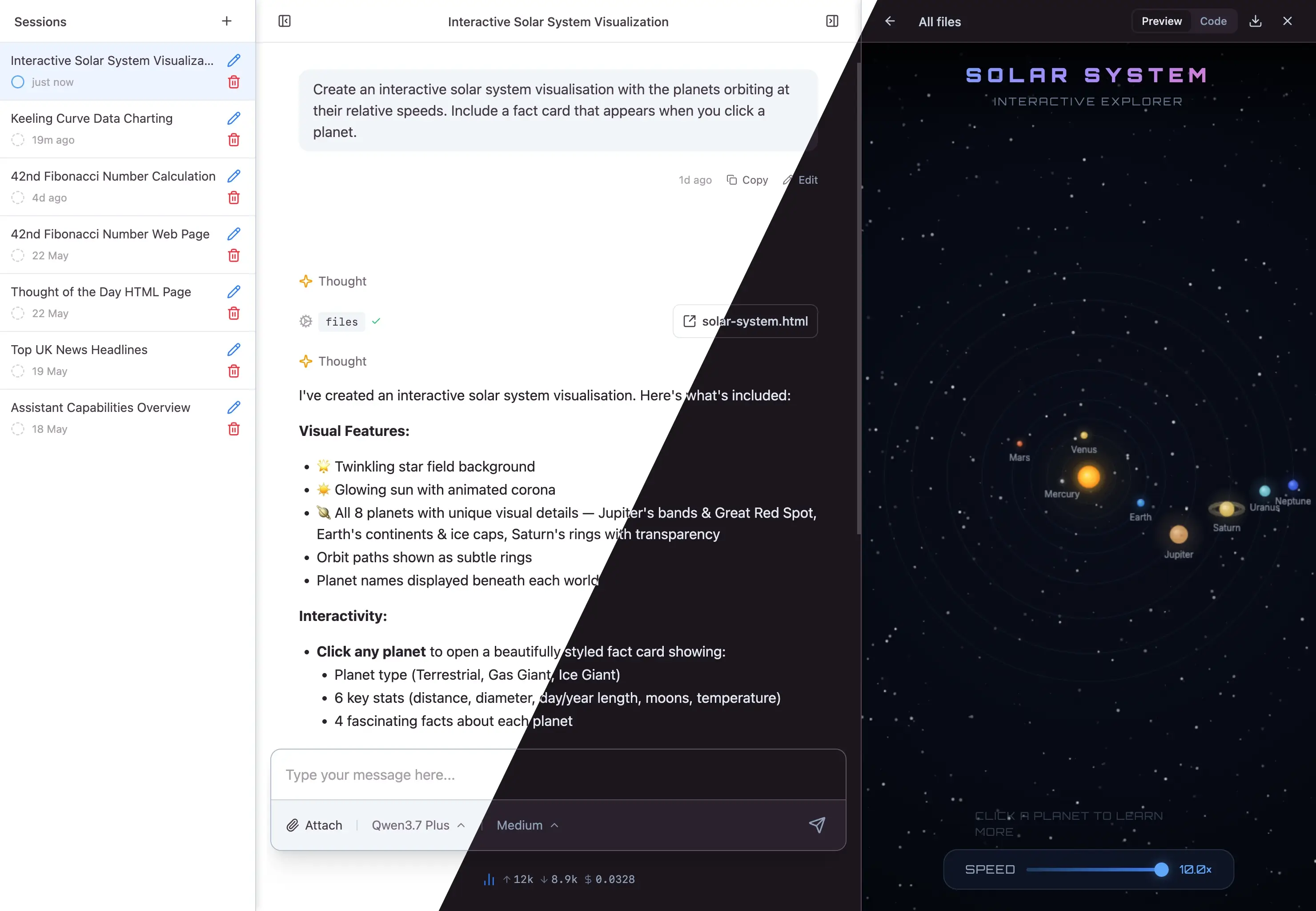
## Features
- **Built on Omni** — multi-provider LLM support, streaming, tool use, structured output, persistent sessions, branching conversations, and pluggable storage — all inherited from [Omni](https://github.com/aaronrussell/omni), [Omni Agent](https://github.com/aaronrussell/omni_agent), and [Omni Tools](https://github.com/aaronrussell/omni_tools)
- **Drop-in agent chat** — `AgentLive` mounts a complete interface with a files panel, Elixir REPL, and web tools wired up out of the box
- **Build your own** — `use Omni.UI` adds session plumbing to any LiveView; compose with `ChatUI` and `CoreUI` components for the rendering layer
- **Themeable** — semantic colour tokens with light and dark mode support
## Installation
Add Omni UI to your dependencies:
```elixir
def deps do
[
{:omni_ui, "~> 0.1"}
]
end
```
Omni UI depends on `omni`, which provides the LLM API layer. Configure your provider API keys as described in the [Omni README](https://github.com/aaronrussell/omni#installation).
### Requirements
Omni UI uses colocated CSS and JavaScript (extracted at compile time by the `:phoenix_live_view` compiler). This requires:
- Phoenix 1.8+
- Phoenix LiveView 1.2+
- Tailwind 4.2.3+
New Phoenix applications generated from 1.8.8 onwards are ready out of the box.
### Assets
Omni UI ships its CSS and JavaScript as colocated assets — no static files to copy. Your application imports them from the `phoenix-colocated` build output.
In your CSS entry point, import the colocated stylesheet and add a `@source` directive so Tailwind can scan the component templates:
```css
/* assets/css/app.css */
@import "phoenix-colocated/omni_ui/colocated.css";
@source "../../deps/omni_ui/lib";
```
In your JavaScript entry point, import the colocated hooks and spread them into your LiveSocket:
```js
// assets/js/app.js
import {hooks as omniHooks} from "phoenix-colocated/omni_ui"
const liveSocket = new LiveSocket("/live", Socket, {
hooks: {...omniHooks},
// ...
})
```
Both require your bundler's module resolution to include `Mix.Project.build_path()`. For esbuild and Tailwind, this is configured via the `NODE_PATH` environment variable, which is the default for Phoenix 1.8+ applications.
The CSS defines [OKLCH](https://oklch.com/) semantic colour tokens (`--color-omni-bg`, `--color-omni-text`, `--color-omni-accent-1`, etc.) with light and dark variants. Override any token in your own CSS to match your application's palette.
### Syntax highlighting
Omni UI uses [mdex](https://github.com/leandrocp/mdex) for Markdown rendering with syntax highlighting powered by [lumis](https://github.com/leandrocp/lumis). Enable it in your application config:
```elixir
# config/config.exs
config :mdex_native, syntax_highlighter: :lumis
```
## Quick start
The fastest way to see Omni running in your app. Mount the built-in `AgentLive`, add the session manager to your supervision tree, and you're done.
### 1. Configure
```elixir
# config/config.exs
config :mdex_native, syntax_highlighter: :lumis
config :omni_ui, Omni.UI.Sessions,
store: {Omni.Session.Stores.FileSystem, base_dir: "priv/sessions"},
title_generator: {:anthropic, "claude-haiku-4-5"}
config :omni_ui, Omni.UI.AgentLive,
providers: [:anthropic],
default_model: {:anthropic, "claude-sonnet-4-6"}
```
### 2. Add it to your supervision tree
```elixir
# application.ex
children = [
# ... your other children
Omni.UI.Sessions,
]
```
### 3. Mount in your router
```elixir
# router.ex
scope "/" do
pipe_through :browser
live "/", Omni.UI.AgentLive
end
forward "/omni_files", Omni.UI.Files.Plug
```
Start your server and open the browser — you have a working agent chat with sessions, files, REPL, and web tools.
## Build your own
When you want full control over the layout, tools, or event handling, skip `AgentLive` and `use Omni.UI` in your own LiveView. The macro injects session streaming, state management, and event routing — you bring the template and any custom behaviour.
```elixir
defmodule MyAppWeb.ChatLive do
use Phoenix.LiveView
use Omni.UI
def render(assigns) do
~H"""
<.chat_interface>
<.turn_list stream={@streams.turns} tool_components={@tool_components} />
<.turn :if={@current_turn} turn={@current_turn} tool_components={@tool_components} />
<:editor>
<.editor model={@model} />
</:editor>
</.chat_interface>
"""
end
def mount(_params, _session, socket) do
{:ok, init_session(socket, model: {:anthropic, "claude-sonnet-4-6"})}
end
def handle_params(params, _uri, socket) do
{:noreply, attach_session(socket, id: params["session_id"])}
end
end
```
See the `Omni.UI` module documentation for the full API — session lifecycle, custom agents, tool components, configuration, and the `session_event` callback.
## Documentation
Full API reference is available on [HexDocs](https://hexdocs.pm/omni_ui).
## License
This package is open source and released under the [Apache-2 License](https://github.com/aaronrussell/omni_ui/blob/main/LICENSE).
© Copyright 2026 [Push Code Ltd](https://www.pushcode.com/).