# Sagents
> **Sage Agents** - Combining the wisdom of a [Sage](https://en.wikipedia.org/wiki/Sage_(philosophy)) with the power of LLM-based Agents
A sage is a person who has attained wisdom and is often characterized by sound judgment and deep understanding. Sagents brings this philosophy to AI agents: building systems that don't just execute tasks, but do so with thoughtful human oversight, efficient resource management, and extensible architecture.
## Key Features
- **Human-In-The-Loop (HITL)** - Customizable permission system that pauses execution for approval on sensitive operations
- **SubAgents** - Delegate complex tasks to specialized child agents for efficient context management and parallel execution
- **GenServer Architecture** - Each agent runs as a supervised OTP process with automatic lifecycle management
- **Phoenix.Presence Integration** - Smart resource management that knows when to shut down idle agents
- **PubSub Real-Time Events** - Stream agent state, messages, and events to multiple LiveView subscribers
- **Middleware System** - Extensible plugin architecture for adding capabilities to agents
- **State Persistence** - Save and restore agent conversations with code generators for database schemas
- **Virtual Filesystem** - Isolated, in-memory file operations with optional persistence
**See it in action!** Try the [agents_demo](https://github.com/sagents-ai/agents_demo) application to experience Sagents interactively, or add the [sagents_live_debugger](https://github.com/sagents-ai/sagents_live_debugger) to your app for real-time insights into agent configuration, state, and event flows.
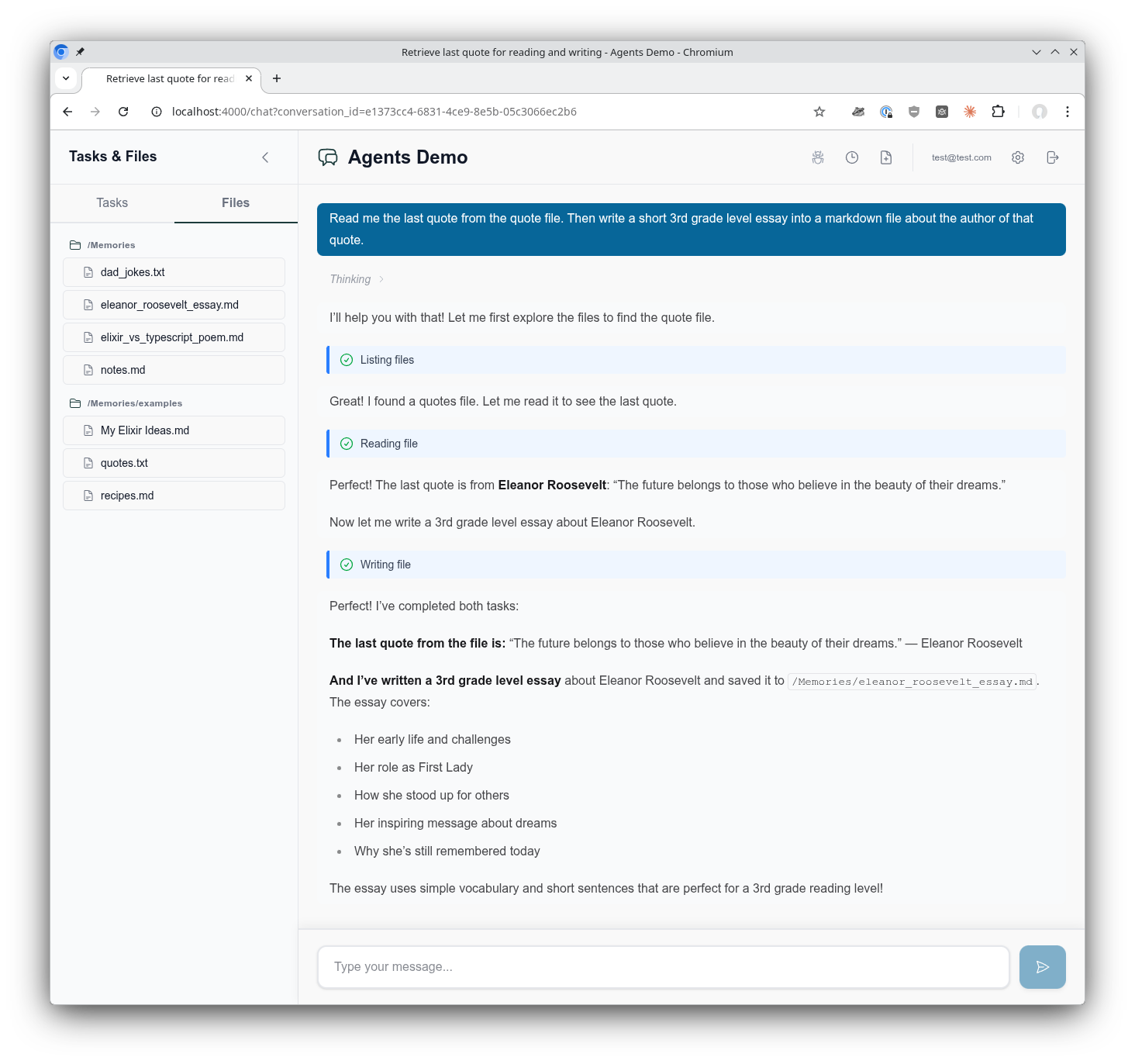
*The [AgentsDemo](https://github.com/sagents-ai/agents_demo) chat interface showing the use of a virtual filesystem, tool call execution, composable middleware, supervised Agentic GenServer assistant, and much more!*
## Who Is This For?
Sagents is designed for Elixir developers building **interactive AI applications** where:
- Users have real-time conversations with AI agents
- Human oversight is required for certain operations (file deletes, API calls, etc.)
- Multiple concurrent conversations need isolated agent processes
- Agent state must persist across sessions
- Real-time UI updates are essential (Phoenix LiveView)
If you're building a simple CLI tool or batch processing pipeline, the core [LangChain](https://github.com/brainlid/langchain) library may be sufficient. Sagents adds the orchestration layer needed for production interactive applications.
**What about non-interactive agents?** Certainly! Sagents works perfectly well for background agents without a UI. You'd simply skip the UI state management helpers and omit middleware like HumanInTheLoop. The agent still runs as a supervised GenServer with all the benefits of state persistence, middleware capabilities, and SubAgent delegation. The [sagents_live_debugger](https://github.com/sagents-ai/sagents_live_debugger) package remains valuable for gaining visibility into what your agents are doing, even without an end-user interface.
## Installation
Add `sagents` to your list of dependencies in `mix.exs`:
```elixir
def deps do
[
{:sagents, "~> 0.1.0"}
]
end
```
LangChain is automatically included as a dependency.
## Configuration
Sagents builds on the [Elixir LangChain](https://github.com/brainlid/langchain) library for LLM integration. To use Sagents, you need to configure an LLM provider by setting the appropriate API key as an environment variable:
```bash
# For Anthropic (Claude)
export ANTHROPIC_API_KEY="your-api-key"
# For OpenAI (GPT)
export OPENAI_API_KEY="your-api-key"
# For Google (Gemini)
export GOOGLE_API_KEY="your-api-key"
```
Then specify the model when creating your agent:
```elixir
# Anthropic Claude
alias LangChain.ChatModels.ChatAnthropic
model = ChatAnthropic.new!(%{model: "claude-sonnet-4-5-20250929"})
# OpenAI GPT
alias LangChain.ChatModels.ChatOpenAI
model = ChatOpenAI.new!(%{model: "gpt-4o"})
# Google Gemini
alias LangChain.ChatModels.ChatGoogleAI
model = ChatGoogleAI.new!(%{model: "gemini-2.0-flash-exp"})
```
For detailed configuration options, start here [LangChain documentation](https://hexdocs.pm/langchain/readme.html#installation).
## Quick Start
### 1. Create an Agent
```elixir
alias Sagents.{Agent, AgentServer, State}
alias Sagents.Middleware.{TodoList, FileSystem, HumanInTheLoop}
alias LangChain.ChatModels.ChatAnthropic
alias LangChain.Message
# Create agent with middleware capabilities
{:ok, agent} = Agent.new(%{
agent_id: "my-agent-1",
model: ChatAnthropic.new!(%{model: "claude-sonnet-4-5-20250929"}),
base_system_prompt: "You are a helpful coding assistant.",
middleware: [
TodoList,
FileSystem,
{HumanInTheLoop, [
interrupt_on: %{
"write_file" => true,
"delete_file" => true
}
]}
]
})
```
### 2. Start the AgentServer
```elixir
# Create initial state
state = State.new!(%{
messages: [Message.new_user!("Create a hello world program")]
})
# Start the AgentServer (runs as a supervised GenServer)
{:ok, _pid} = AgentServer.start_link(
agent: agent,
initial_state: state,
pubsub: {Phoenix.PubSub, :my_app_pubsub},
inactivity_timeout: 3_600_000 # 1 hour
)
# Subscribe to real-time events
AgentServer.subscribe("my-agent-1")
# Execute the agent
:ok = AgentServer.execute("my-agent-1")
```
### 3. Handle Events
```elixir
# In your LiveView or GenServer
def handle_info({:agent, event}, socket) do
case event do
{:status_changed, :running, nil} ->
# Agent started processing
{:noreply, assign(socket, status: :running)}
{:llm_deltas, deltas} ->
# Streaming tokens received
{:noreply, stream_tokens(socket, deltas)}
{:llm_message, message} ->
# Complete message received
{:noreply, add_message(socket, message)}
{:todos_updated, todos} ->
# Agent's TODO list changed
{:noreply, assign(socket, todos: todos)}
{:status_changed, :interrupted, interrupt_data} ->
# Human approval needed
{:noreply, show_approval_dialog(socket, interrupt_data)}
{:status_changed, :idle, nil} ->
# Agent completed
{:noreply, assign(socket, status: :idle)}
{:agent_shutdown, metadata} ->
# Agent shutting down (inactivity or no viewers)
{:noreply, handle_shutdown(socket, metadata)}
end
end
```
### 4. Handle Human-In-The-Loop Approvals
```elixir
# When agent needs approval, it returns interrupt data
# User reviews and provides decisions
decisions = [
%{type: :approve}, # Approve first tool call
%{type: :edit, arguments: %{"path" => "safe.txt"}}, # Edit second tool call
%{type: :reject} # Reject third tool call
]
# Resume execution with decisions
:ok = AgentServer.resume("my-agent-1", decisions)
```
## Provided Middleware
Sagents includes several pre-built middleware components:
| Middleware | Description |
|------------|-------------|
| **TodoList** | Task management with `write_todos` tool for tracking multi-step work |
| **FileSystem** | Virtual filesystem with `ls`, `read_file`, `write_file`, `edit_file`, `search_text`, `edit_lines`, `delete_file` |
| **HumanInTheLoop** | Pause execution for human approval on configurable tools |
| **SubAgent** | Delegate tasks to specialized child agents for parallel execution |
| **Summarization** | Automatic conversation compression when token limits approach |
| **PatchToolCalls** | Fix dangling tool calls from interrupted conversations |
| **ConversationTitle** | Auto-generate conversation titles from first user message |
### FileSystem Middleware
```elixir
{:ok, agent} = Agent.new(%{
# ...
middleware: [
{FileSystem, [
enabled_tools: ["ls", "read_file", "write_file", "edit_file"],
# Optional: persistence callbacks
persistence: MyApp.FilePersistence,
context: %{user_id: current_user.id}
]}
]
})
```
### SubAgent Middleware
SubAgents provide efficient context management by isolating complex tasks:
```elixir
{:ok, agent} = Agent.new(%{
# ...
middleware: [
{SubAgent, [
model: ChatAnthropic.new!(%{model: "claude-sonnet-4-5-20250929"}),
subagents: [
SubAgent.Config.new!(%{
name: "researcher",
description: "Research topics using web search",
system_prompt: "You are an expert researcher...",
tools: [web_search_tool]
}),
SubAgent.Compiled.new!(%{
name: "coder",
description: "Write and review code",
agent: pre_built_coder_agent
})
],
# Prevent recursive SubAgent nesting
block_middleware: [ConversationTitle, Summarization]
]}
]
})
```
SubAgents also respect HITL permissions - if a SubAgent attempts a protected operation, the interrupt propagates to the parent for approval.
### Human-In-The-Loop Middleware
Configure which tools require human approval:
```elixir
{HumanInTheLoop, [
interrupt_on: %{
# Simple boolean
"write_file" => true,
"delete_file" => true,
# Advanced: customize allowed decisions
"execute_command" => %{
allowed_decisions: [:approve, :reject] # No edit option
}
}
]}
```
Decision types:
- `:approve` - Execute with original arguments
- `:edit` - Execute with modified arguments
- `:reject` - Skip execution, inform agent of rejection
## Custom Middleware
Create your own middleware by implementing the `Sagents.Middleware` behaviour:
```elixir
defmodule MyApp.CustomMiddleware do
@behaviour Sagents.Middleware
@impl true
def init(opts) do
config = %{
enabled: Keyword.get(opts, :enabled, true)
}
{:ok, config}
end
@impl true
def system_prompt(_config) do
"You have access to custom capabilities."
end
@impl true
def tools(config) do
[my_custom_tool(config)]
end
@impl true
def before_model(state, _config) do
# Preprocess state before LLM call
{:ok, state}
end
@impl true
def after_model(state, _config) do
# Postprocess state after LLM response
# Return {:interrupt, state, interrupt_data} to pause for HITL
{:ok, state}
end
@impl true
def handle_message(message, state, _config) do
# Handle async messages from spawned tasks
{:ok, state}
end
@impl true
def on_server_start(state, _config) do
# Called when AgentServer starts - broadcast initial state
{:ok, state}
end
end
```
## Quick Setup
Sagents provides generators to scaffold everything you need for conversation-centric agents:
```bash
mix sagents.setup MyApp.Conversations \
--scope MyApp.Accounts.Scope \
--owner-type user \
--owner-field user_id
```
This generates:
- **Persistence layer** - Database schemas and migration
- **Factory module** - Agent creation with model/middleware configuration
- **Coordinator module** - Session management and lifecycle orchestration
All configured to work together seamlessly based on your `--owner-type` and `--owner-field` settings.
### What Gets Generated
The `mix sagents.setup` command creates a complete conversation infrastructure:
#### 1. Persistence Layer
- **Context module** (`MyApp.Conversations`) with CRUD operations
- **Schemas**: Conversation, AgentState, DisplayMessage
- **Database migration** for all tables
#### 2. Factory Module
Centralizes agent creation at `MyApp.Agents.Factory` with:
- Model configuration (ChatAnthropic by default, with fallback examples)
- Default middleware stack (TodoList, FileSystem, SubAgent, Summarization, etc.)
- Human-in-the-Loop configuration
- Automatic filesystem scope extraction based on your owner type/field
**Key functions to customize:**
- `get_model_config/0` - Change LLM provider (OpenAI, Ollama, etc.)
- `get_fallback_models/0` - Configure model fallbacks for resilience
- `base_system_prompt/0` - Define your agent's personality and capabilities
- `build_middleware/3` - Add/remove middleware from the stack
- `default_interrupt_on/0` - Configure which tools require human approval
- `get_filesystem_scope/1` - Customize filesystem scoping strategy
#### 3. Coordinator Module
Manages agent lifecycles at `MyApp.Agents.Coordinator` with:
- Conversation ID → Agent ID mapping
- On-demand agent starting with idempotent session management
- State loading from your Conversations context
- Race condition handling for concurrent starts
- Phoenix.Presence integration for viewer tracking
**Key functions to customize:**
- `conversation_agent_id/1` - Change the agent_id mapping strategy
- `create_conversation_state/1` - Customize state loading behavior
### LiveView Helpers Generator
For Phoenix LiveView integration, generate a helpers module with reusable handlers for all agent events:
```bash
mix sagents.gen.live_helpers MyAppWeb.AgentLiveHelpers \
--context MyApp.Conversations
```
This generates a module with handler functions that follow the LiveView socket-in/socket-out pattern:
- **Status handlers** - `handle_status_running/1`, `handle_status_idle/1`, `handle_status_cancelled/1`, `handle_status_error/2`, `handle_status_interrupted/2`
- **Message handlers** - `handle_llm_deltas/2`, `handle_llm_message_complete/1`, `handle_display_message_saved/2`
- **Tool execution handlers** - `handle_tool_call_identified/2`, `handle_tool_execution_started/2`, `handle_tool_execution_completed/3`, `handle_tool_execution_failed/3`
- **Lifecycle handlers** - `handle_conversation_title_generated/3`, `handle_agent_shutdown/2`
- **Core helpers** - `persist_agent_state/2`, `reload_messages_from_db/1`, `update_streaming_message/2`
Use them in your LiveView:
```elixir
defmodule MyAppWeb.ChatLive do
alias MyAppWeb.AgentLiveHelpers
def handle_info({:agent, {:status_changed, :running, nil}}, socket) do
{:noreply, AgentLiveHelpers.handle_status_running(socket)}
end
def handle_info({:agent, {:llm_deltas, deltas}}, socket) do
{:noreply, AgentLiveHelpers.handle_llm_deltas(socket, deltas)}
end
def handle_info({:agent, {:status_changed, :idle, _data}}, socket) do
{:noreply, AgentLiveHelpers.handle_status_idle(socket)}
end
end
```
**Options:**
- `--context` (required) - Your conversations context module
- `--test-path` - Custom test file directory (default: inferred from module path)
- `--no-test` - Skip generating the test file
### Advanced Options
```bash
mix sagents.setup MyApp.Conversations \
--scope MyApp.Accounts.Scope \
--owner-type user \
--owner-field user_id \
--factory MyApp.Agents.Factory \
--coordinator MyApp.Agents.Coordinator \
--pubsub MyApp.PubSub \
--presence MyAppWeb.Presence \
--table-prefix sagents_
```
All options have sensible defaults based on your context module and Phoenix conventions.
For a fully customized example, see the [agents_demo](https://github.com/sagents-ai/agents_demo) project.
### Usage Pattern
```elixir
# Create conversation
{:ok, conversation} = Conversations.create_conversation(scope, %{title: "My Chat"})
# Save state during execution
state = AgentServer.export_state(agent_id)
Conversations.save_agent_state(conversation.id, state)
# Restore conversation later
{:ok, persisted_state} = Conversations.load_agent_state(conversation.id)
# Create agent from code (middleware/tools come from code, not database)
{:ok, agent} = MyApp.AgentFactory.create_agent(agent_id: "conv-#{conversation.id}")
# Start with restored state
{:ok, pid} = AgentServer.start_link_from_state(
persisted_state,
agent: agent,
agent_id: "conv-#{conversation.id}",
pubsub: {Phoenix.PubSub, :my_pubsub}
)
```
## Agent Lifecycle Management
### Process Architecture
Sagents uses a flexible supervision architecture built on OTP principles with Registry-based process discovery:
```
Sagents.Application
├── Sagents.Registry (keys: :unique)
│ └── Process Discovery via Registry Keys:
│ ├── {:agent_supervisor, agent_id}
│ ├── {:agent_server, agent_id}
│ ├── {:sub_agents_supervisor, agent_id}
│ └── {:filesystem_server, scope_key}
│
├── AgentsDynamicSupervisor
│ ├── AgentSupervisor ("conversation-1")
│ │ ├── AgentServer (registers as {:agent_server, "conversation-1"})
│ │ │ └── Broadcasts on topic: "agent_server:conversation-1"
│ │ └── SubAgentsDynamicSupervisor
│ │ └── SubAgentServer (temporary child agents)
│ │
│ └── AgentSupervisor ("conversation-2")
│ ├── AgentServer
│ └── SubAgentsDynamicSupervisor
│
└── FileSystemSupervisor (independent, flexible scoping)
├── FileSystemServer ({:user, 1}) # User-scoped
├── FileSystemServer ({:user, 2})
└── FileSystemServer ({:project, 42}) # Project-scoped
```
#### Key Design Principles
**Registry-Based Discovery**: All processes register with `Sagents.Registry` using structured tuple keys. Process lookup happens through Registry, not supervision tree traversal. This enables fast, global process discovery.
**Dynamic Agent Lifecycle**: AgentSupervisor instances are started on-demand by the Coordinator via `AgentsDynamicSupervisor.start_agent_sync/1`. The `_sync` variant waits for full registration before returning, preventing race conditions when immediately subscribing to agent events.
**Independent Filesystem Scoping**: FileSystemSupervisor is **separate from agent supervision**, allowing flexible lifetime and scope management:
- User-scoped filesystem shared across multiple conversations
- Project-scoped filesystem shared across multiple users
- Organization-scoped filesystem for team collaboration
- Agents reference filesystems by `scope_key`, not PID
**Supervision Strategy**: Each AgentSupervisor uses `:rest_for_one` strategy:
- If AgentServer crashes → SubAgentsDynamicSupervisor restarts
- If SubAgentsDynamicSupervisor crashes → only it restarts
- All children use `restart: :temporary` (no automatic restart)
### Inactivity Timeout
Agents automatically shut down after inactivity:
```elixir
AgentServer.start_link(
agent: agent,
inactivity_timeout: 3_600_000 # 1 hour (default: 5 minutes)
# or nil/:infinity to disable
)
```
### Presence-Based Shutdown
With Phoenix.Presence, agents can detect when no clients are viewing and shut down immediately:
```elixir
AgentServer.start_link(
agent: agent,
presence_tracking: [
enabled: true,
presence_module: MyApp.Presence,
topic: "conversation:#{conversation_id}"
]
)
```
When an agent completes and no viewers are connected, it shuts down to free resources.
## PubSub Events
AgentServer broadcasts events on topic `"agent_server:#{agent_id}"`:
### Status Events
- `{:agent, {:status_changed, :idle, nil}}` - Ready for work
- `{:agent, {:status_changed, :running, nil}}` - Executing
- `{:agent, {:status_changed, :interrupted, interrupt_data}}` - Awaiting approval
- `{:agent, {:status_changed, :cancelled, nil}}` - Cancelled by user
- `{:agent, {:status_changed, :error, reason}}` - Execution failed
### Message Events
- `{:agent, {:llm_deltas, [%MessageDelta{}]}}` - Streaming tokens
- `{:agent, {:llm_message, %Message{}}}` - Complete message
- `{:agent, {:llm_token_usage, %TokenUsage{}}}` - Token usage info
- `{:agent, {:display_message_saved, display_message}}` - Message persisted (requires `save_new_message_fn` callback)
### Tool Events
- `{:agent, {:tool_call_identified, tool_info}}` - Tool call detected during streaming
- `{:agent, {:tool_execution_started, tool_info}}` - Tool execution began
- `{:agent, {:tool_execution_completed, call_id, tool_result}}` - Tool execution succeeded
- `{:agent, {:tool_execution_failed, call_id, error}}` - Tool execution failed
### State Events
- `{:agent, {:todos_updated, todos}}` - TODO list snapshot
- `{:agent, {:state_restored, new_state}}` - State restored via `update_agent_and_state/3`
- `{:agent, {:agent_shutdown, metadata}}` - Shutting down
### Debug Events (separate topic)
Subscribe with `AgentServer.subscribe_debug(agent_id)` on topic `"agent_server:debug:#{agent_id}"`:
- `{:agent, {:debug, {:agent_state_update, state}}}` - Full state snapshot
- `{:agent, {:debug, {:middleware_action, module, data}}}` - Middleware events
## Agent Discovery
Find and inspect running agents:
```elixir
# List all running agents
AgentServer.list_running_agents()
# => ["conversation-1", "conversation-2", "user-42"]
# Find agents by pattern
AgentServer.list_agents_matching("conversation-*")
# => ["conversation-1", "conversation-2"]
# Get agent count
AgentServer.agent_count()
# => 3
# Get detailed info
AgentServer.agent_info("conversation-1")
# => %{
# agent_id: "conversation-1",
# pid: #PID<0.1234.0>,
# status: :idle,
# message_count: 5,
# has_interrupt: false
# }
```
## Related Projects
### agents_demo
A complete Phoenix LiveView application demonstrating Sagents in action:
- Multi-conversation support with real-time state persistence
- Human-in-the-loop approval workflows
- File system operations with persistence
- SubAgent delegation patterns
[View agents_demo →](https://github.com/sagents-ai/agents_demo)
### sagents_live_debugger
A Phoenix LiveView dashboard for debugging agent execution in real-time:
- Agent configuration inspection
- Live message flow visualization
- State and event monitoring
- Middleware action tracking
```elixir
# Add to your router
import SagentsLiveDebugger.Router
scope "/dev" do
pipe_through :browser
sagents_live_debugger "/debug/agents",
coordinator: MyApp.Agents.Coordinator,
conversation_provider: &MyApp.list_conversations/0
end
```
[View sagents_live_debugger →](https://github.com/sagents-ai/sagents_live_debugger)
## Conversation Architecture
Sagents uses a **dual-view pattern** for conversations:
- **Agent State** - What the LLM thinks with: complete message history, todos, and middleware state stored as a single serialized blob
- **Display Messages** - What users see: individual UI-friendly records optimized for rendering, streaming, and rich content types
This separation enables:
- **State optimization**: Agent conversation history can be summarized/compacted to reduce token usage without affecting what users see
- **Efficient UI queries**: Load display messages without deserializing agent state
- **Progressive streaming**: Real-time updates as messages arrive via PubSub
- **Flexible rendering**: Show thinking blocks, tool status, images - content the LLM doesn't need
Both views link through the `conversations` table, which you connect to your application's owner model (users, teams, etc.).
See [Conversations Architecture](docs/conversations_architecture.md) for the complete explanation with diagrams.
## Documentation
- [Conversations Architecture](docs/conversations_architecture.md) - How the dual-view pattern works with agent state and display messages
- [Lifecycle Management](docs/lifecycle.md) - Process supervision, timeouts, and shutdown
- [PubSub & Presence](docs/pubsub_presence.md) - Real-time events and viewer tracking
- [Middleware Development](docs/middleware.md) - Building custom middleware
- [State Persistence](docs/persistence.md) - Saving and restoring conversations
- [Middleware Messaging](docs/middleware_messaging.md) - Async messaging between middleware and AgentServer
- [Architecture Overview](docs/architecture.md) - System design and data flow
## Development
```bash
# Install dependencies
mix deps.get
# Run tests
mix test
# Run tests with live API calls (requires API keys, incurs costs)
mix test --include live_call
mix test --include live_anthropic
# Pre-commit checks
mix precommit
```
## Acknowledgments
Sagents was originally inspired by the [LangChain Deep Agents](https://langchain-ai.github.io/langgraph/agents/overview/) project, though it has evolved into its own comprehensive framework tailored for Elixir and Phoenix applications.
Built on top of [Elixir LangChain](https://github.com/brainlid/langchain), which provides the core LLM integration layer.
## License
Apache-2.0 license - see [LICENSE](LICENSE) for details.
